Chick: the 30-day habit tracker for iPhone and iPad Make the next 30 days count.

Chick is a habit tracker built around 30-day sprints. Check off your habits, plan projects, count down to big dates and focus with a Pomodoro timer. You decide what counts as a successful day, and Chick keeps score.

On the App Store for iPhone and iPad
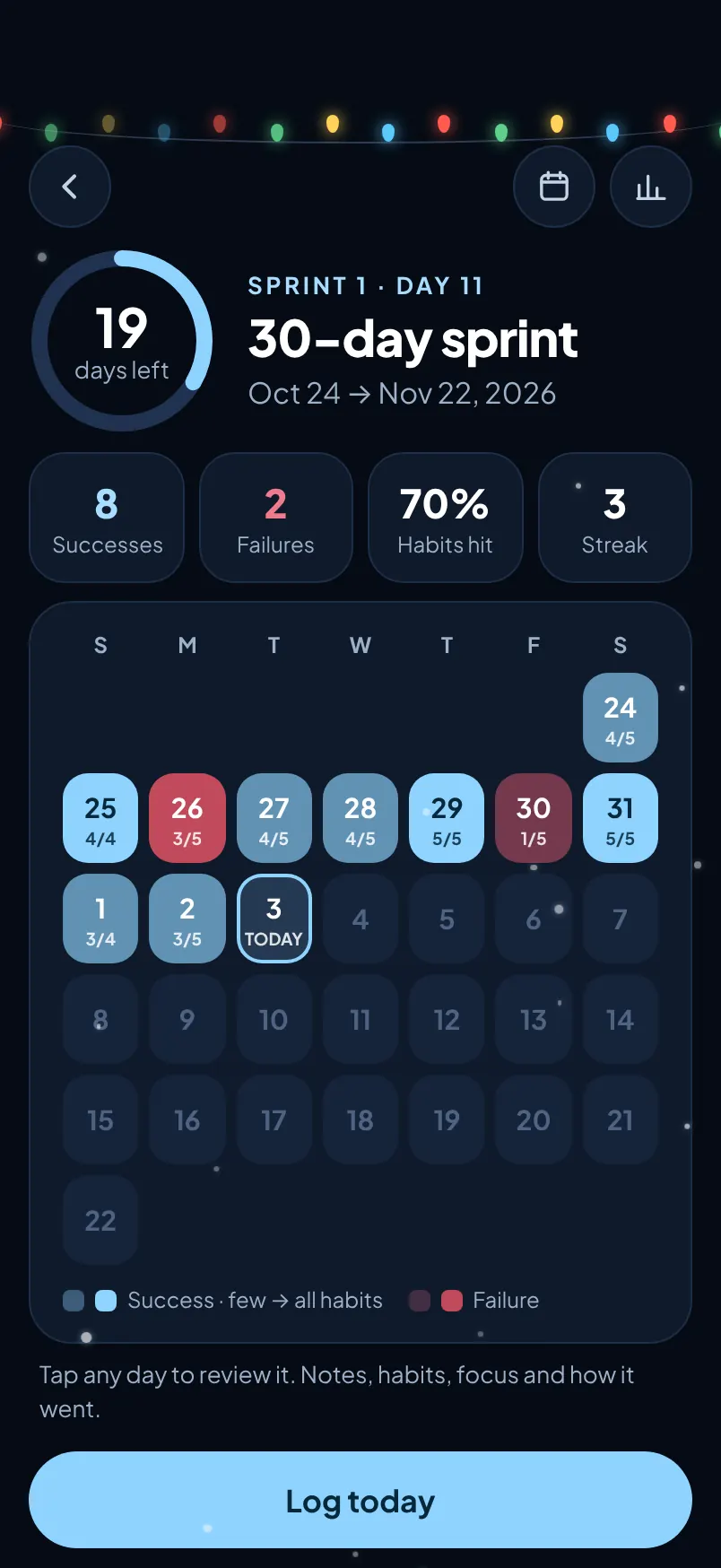
The sprint screen: 19 days left, 8 successes and 2 failures, and a calendar of the sprint
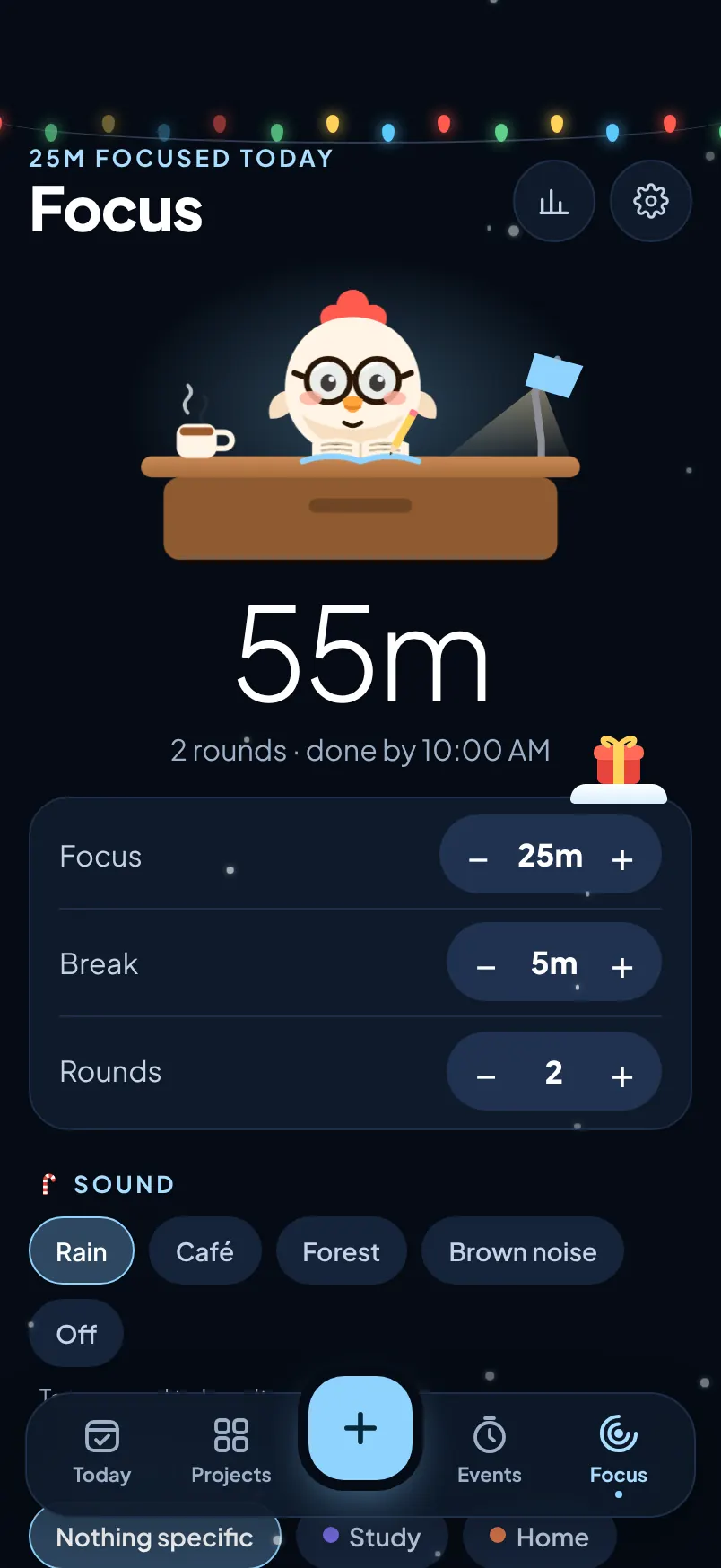
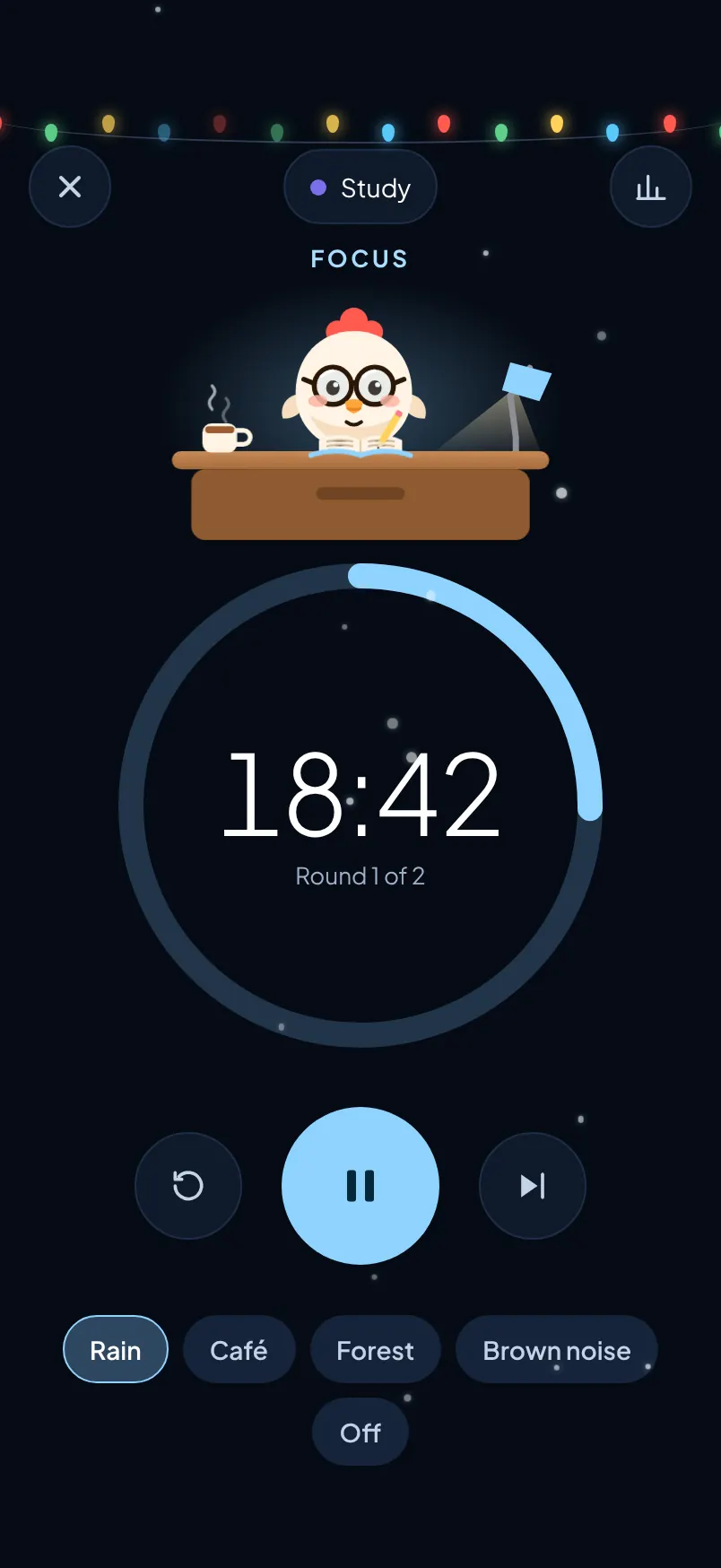
A focus session running, with Chick at the desk and 18:40 left
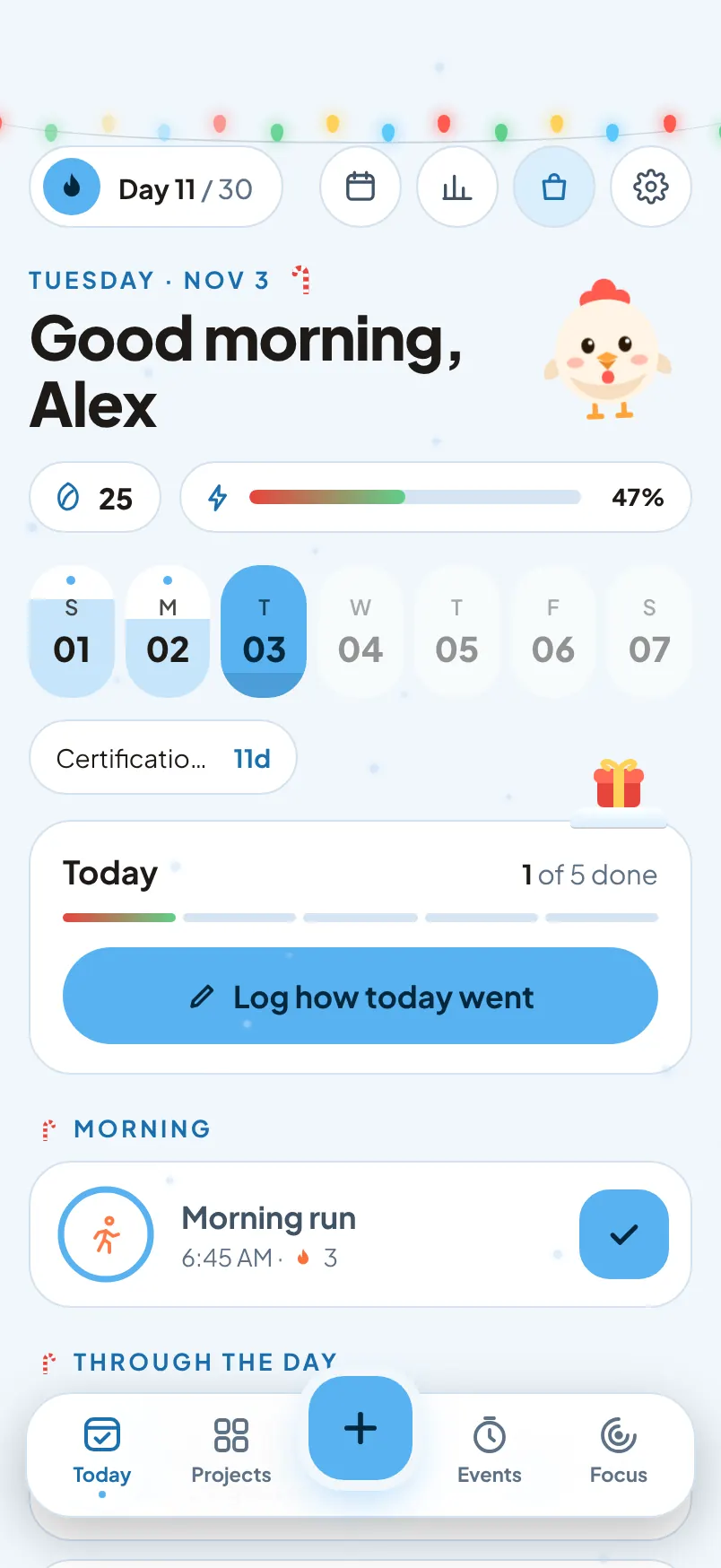
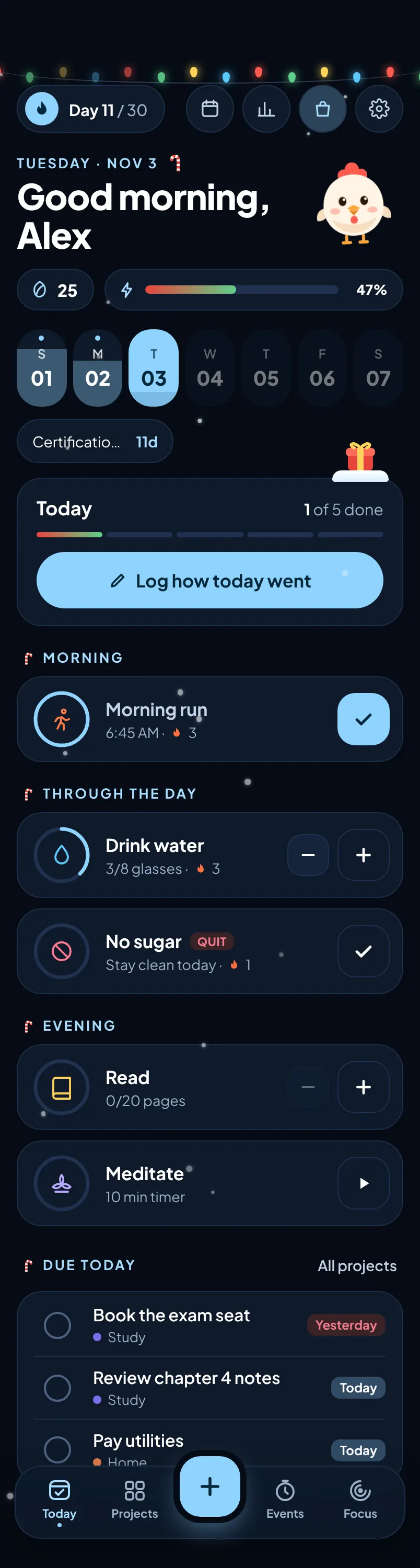
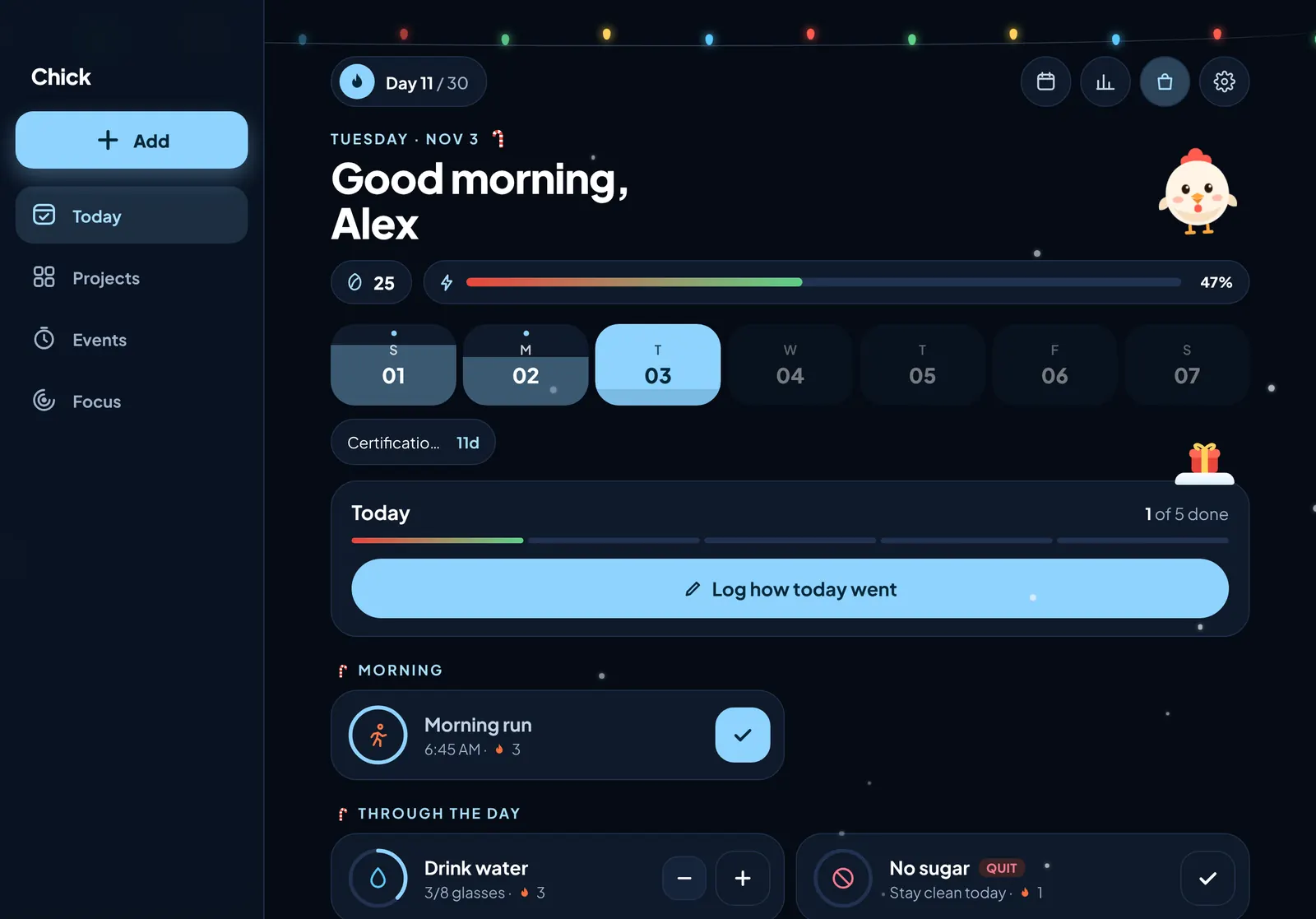
The Today screen: a greeting, the week strip, today's progress and habit cards
Day 10 called a successMon, Nov 2 · every habit done
Best run: 3 days8 successes, 2 failures
+5 seeds for ChickFor logging the day

Sample sprint · Day 11 of 30

8 successes, 2 failures, today still open.

Colour themes, dark and light mode Multiple colour options. Pick one and watch.

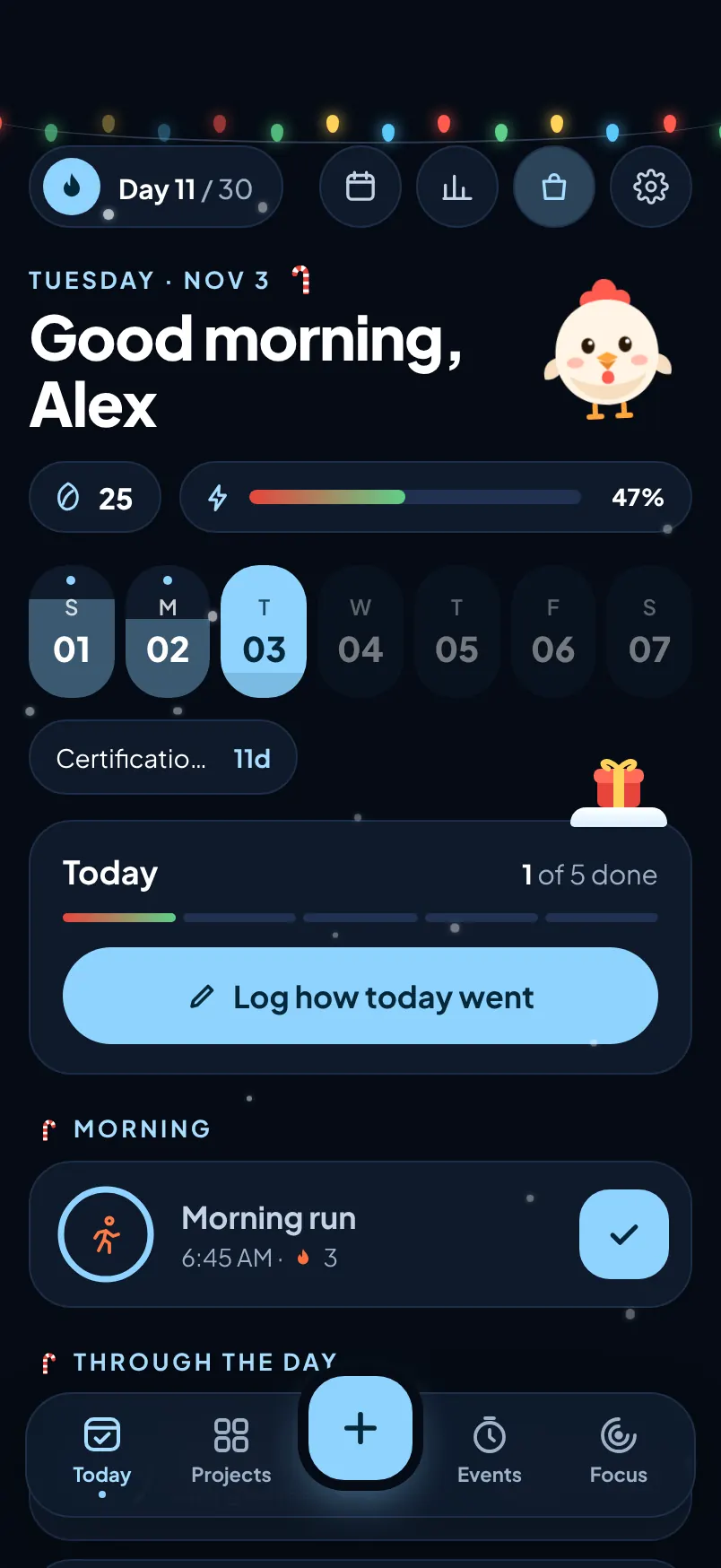
Pick a colour, then dark, light or automatic. Seasonal adds lights, candy canes, falling snow and gift surprises. Choosing one here re-colours this whole page.

Today screen in the selected colour, dark appearanceToday screen in the selected colour, light appearance

Dark

Watch the Chick app tour Thirty seconds with Chick.

0:00

Open the tour on its own page

Habit tracker, to-do list, countdowns and focus timer Today, Projects, Events and Focus share one tab bar.

The plus in the middle adds whatever comes next: a habit, a task, an event or a focus session.

Today

Your day, grouped the way it happens.

  • Morning, through the day, afternoon and evening. Each habit sits where it belongs.
  • A progress ring around every icon, and a check, a counter or a timer to fill it.
  • Streaks, reminders at the time you choose, and a pause for days off.
  • The week strip and today's progress bar sit up top, with your next event beside them.
Chick habit tracker Today screen with morning, daytime and evening habits

Projects

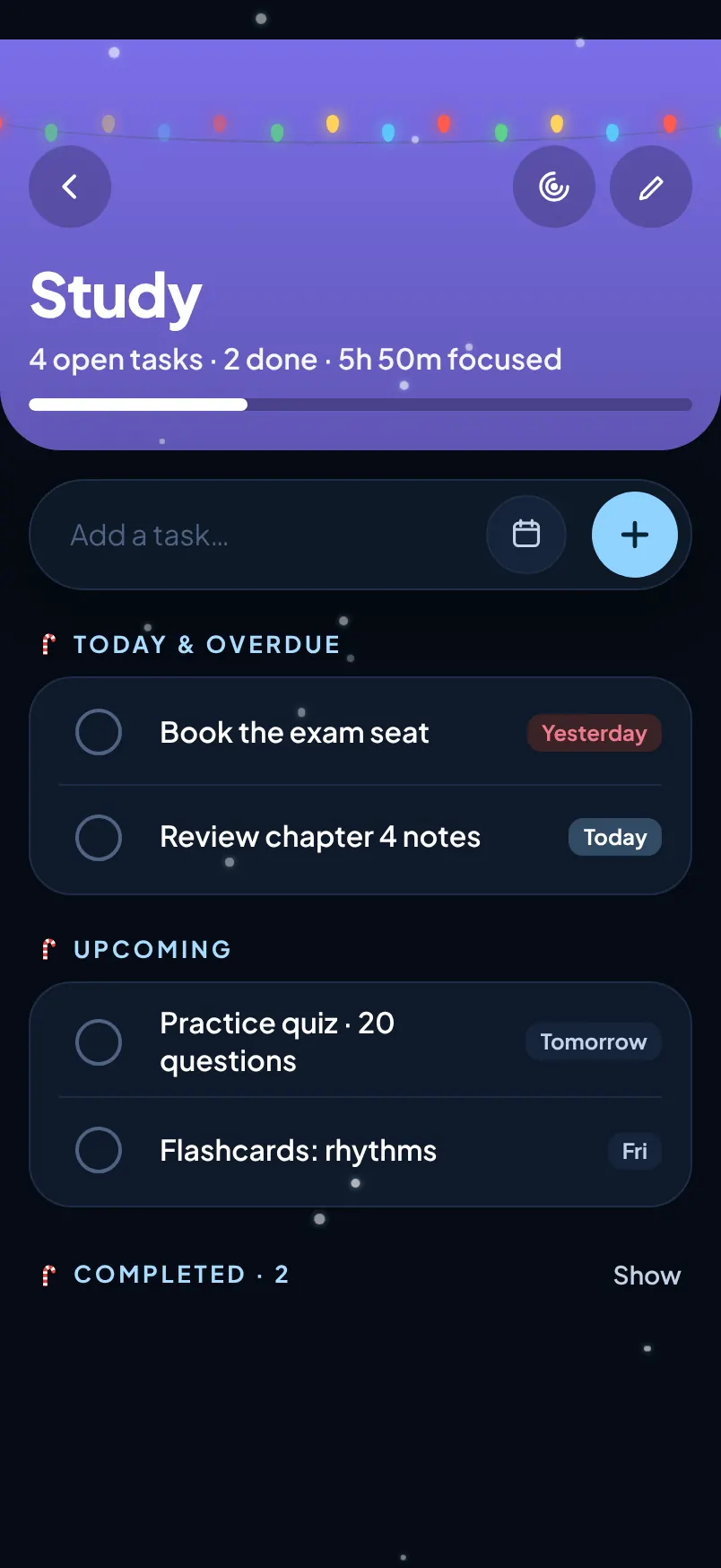
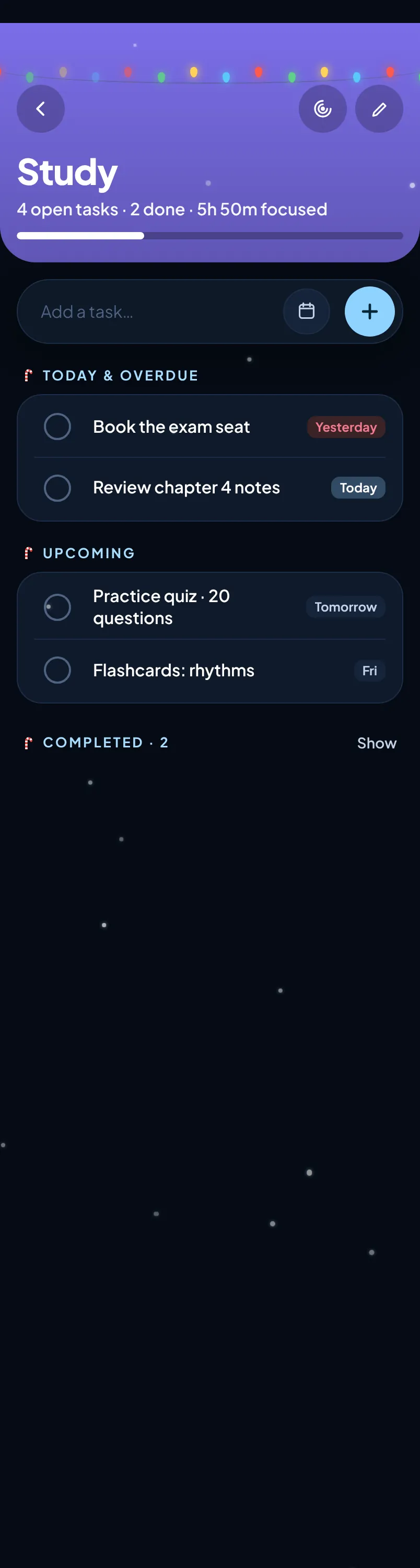
Projects, with tasks that know when they're due.

  • Priorities, due dates and times on every task.
  • Quick add from the top of each project page.
  • Today and overdue, upcoming and completed, sorted for you.
  • Progress and focus time per project, like Study · 5h 50m focused.
The Study project page with tasks due today and upcoming

Events

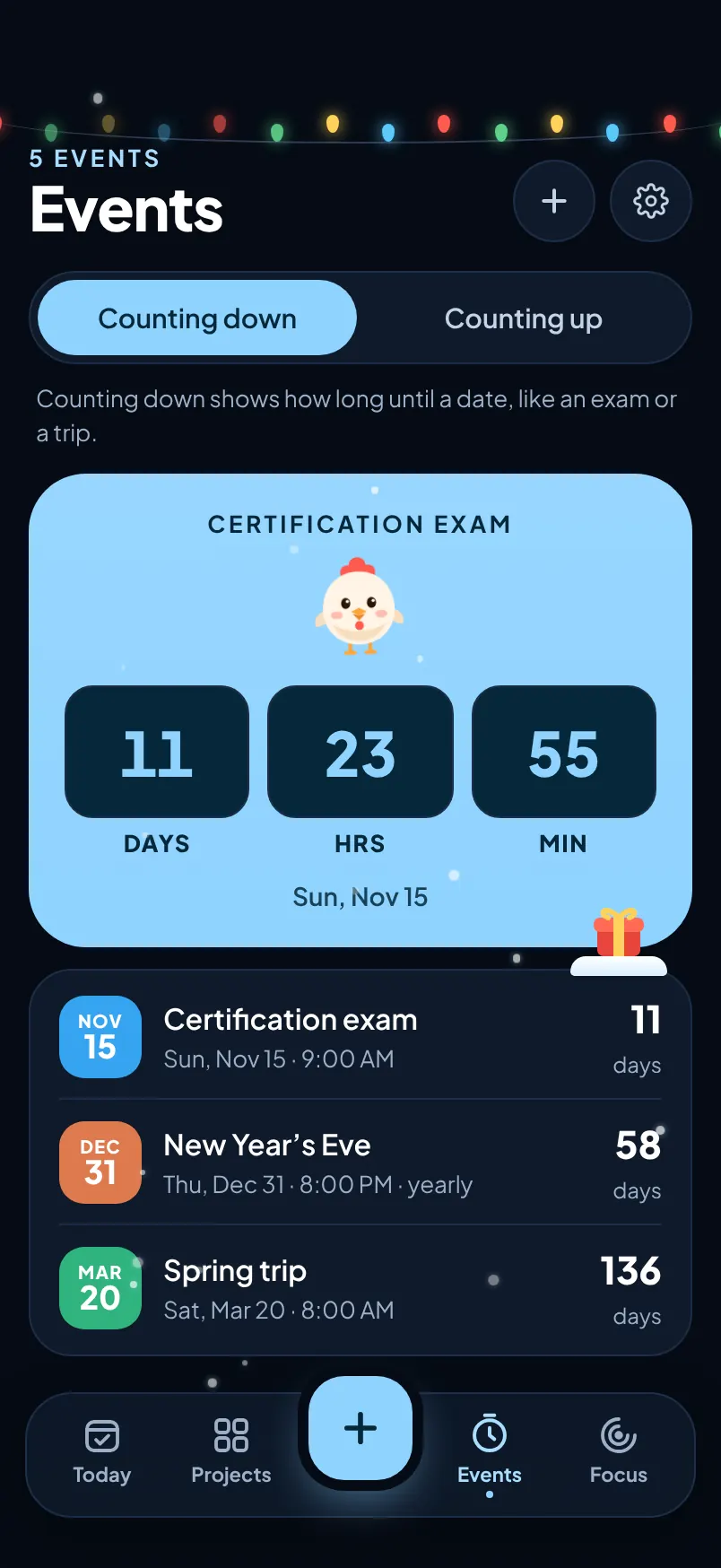
Count down to the dates that matter.

  • Counting down to an exam or a trip, or counting up since a big day.
  • Days, hours and minutes on the big card.
  • Yearly repeats for birthdays and anniversaries.
  • The next one shows on Today, like Certification · 11d.
Events screen with a countdown to a certification exam

Focus

Pomodoro rounds, with Chick at the desk.

  • Set focus, break and rounds, and log it against a project.
  • Timed to the second, even when you leave the app.
  • Rain, Café, Forest and Brown noise, recorded for real.
  • Plays with the silent switch on. A mute switch lives in Settings.
Focus setup with 55 minutes planned over two rounds

30-day habit challenge sprints Every night, you call it.

Your habits shade the calendar, but the verdict is yours. Press and hold Success or Failure to lock in the day, rate your energy and mood, and add a line about why. Try it below.

Day 11Tue, Nov 3 · Today
How did the day go?

Press and hold to lock in your call. With a keyboard, hold Space or Enter.

Habits 1 of 5
Energy
DrainedCharged
Mood
LowGreat
19days left

Sprint 1 · Day 11

30-day sprint

Oct 24 → Nov 22, 2026
Length
8Successes
2Failures
70%Habits hit
3Streak

A sprint runs 30 days by default. Pick anything from 7 to 90.

Habit calendar, streaks and insights See what actually moved the needle.

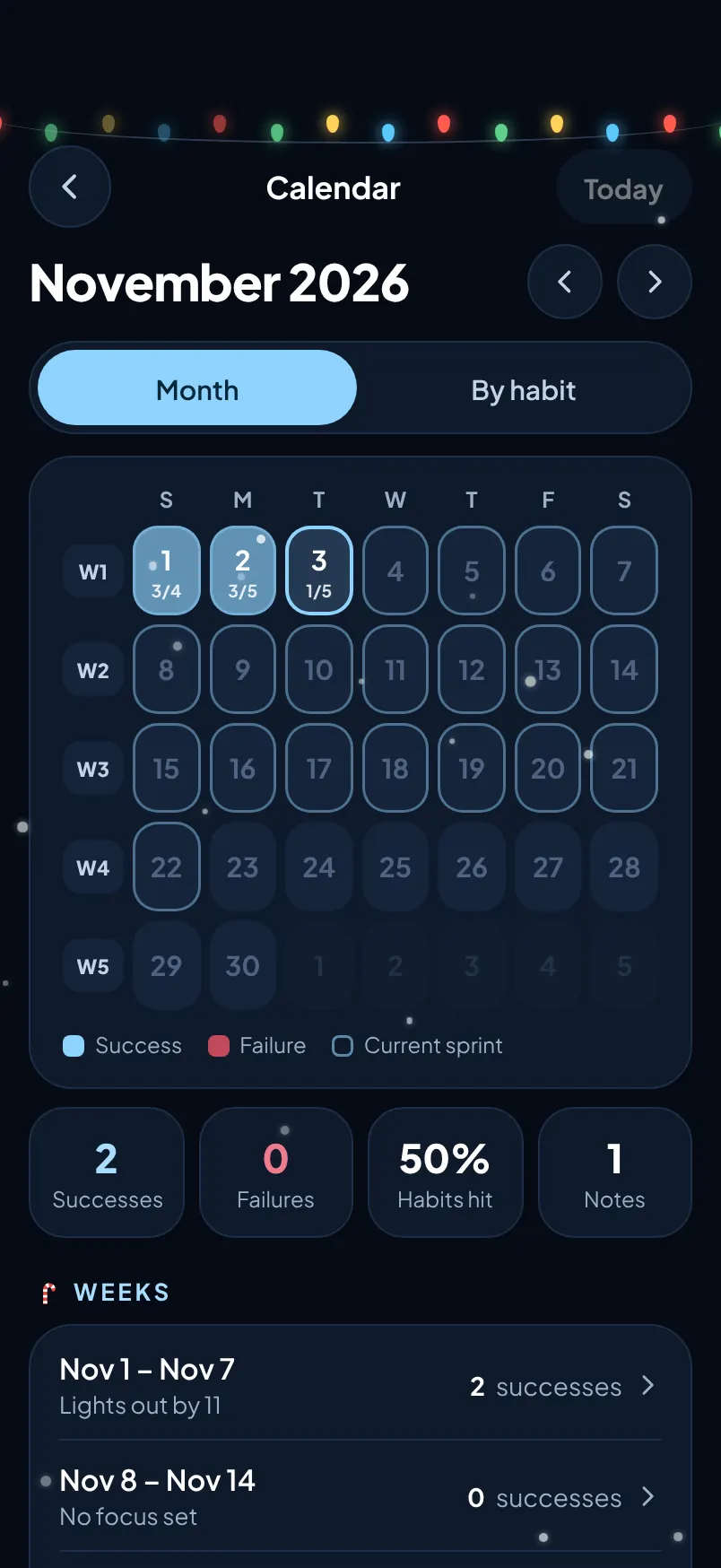
A month view of the whole sprint, a grid per habit, and insights that fill in as you log: success rate, habits hit, best run, focus, tasks done, energy and mood.

Calendar: November 2026 with successes and failures, and weekly totals
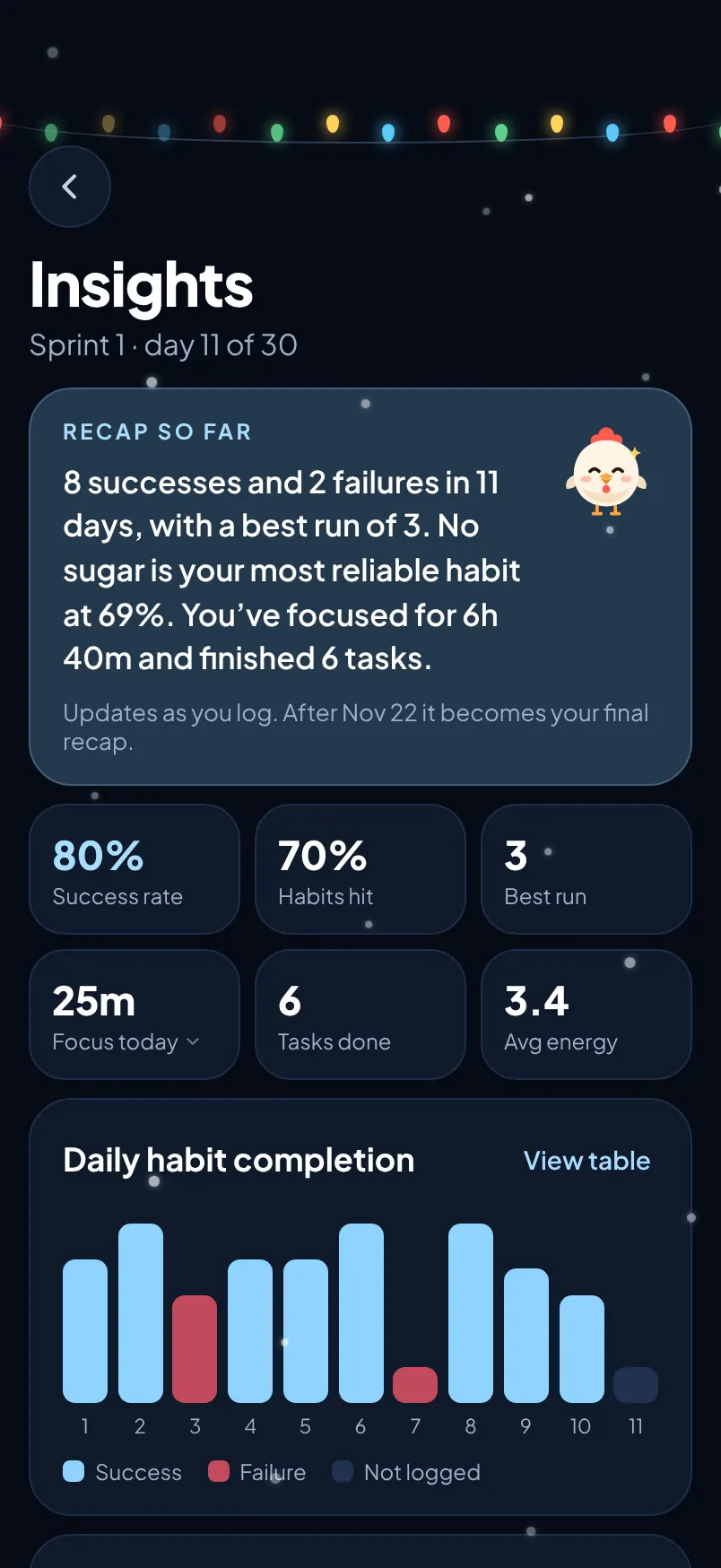
Insights: a recap, success rate 80%, habits hit 70%, and a daily habit chart

Recap so far

8 successes and 2 failures in 11 days, with a best run of 3. No sugar is your most reliable habit.

Updates as you log. When the sprint ends it becomes your final recap.
Daily habit completion

Days 1 to 10

SuccessFailure
Energy and mood
Energy · 1 drained, 5 chargedMood
This week Nov 1 – Nov 7
Your focusLights out by 11
What went wellWater every day, and three wins in a row.
What got in the wayLate nights, and sugar crept back in.
Settings · Your data

Your data leaves with you.

Export every logged day as a CSV file, or copy it straight into Sheets or Excel. Erase everything with one button.


Pomodoro focus timer and event countdowns A timer that runs. A countdown that counts.

Study
18:40
Round 1 of 2
New Year's Eve
0DAYS
00HRS
00MIN
00SEC
Thu, Dec 31 · 12:00 AM · repeats yearly

Home Screen widgets and Dynamic Island Chick keeps you company.

Start a focus session and swipe home. Chick and the timer move to the Dynamic Island and the Lock Screen. Widgets in small, medium and large show today at a glance.

Day 11
1 of 5 done
47%
Today's habits
Morning runDrink water · 3/8Read · 0/20 pagesMeditate · 10 min
Chick · Day 11 / 30

Rewards for keeping your habits Seeds for showing up. A closet for Chick.

Log a day and you earn seeds. Spend them in Chick's closet on hats, glasses, scarves and things for the desk. In the Seasonal theme, a gift hides on each tab once a day. Try things on here for free.

25

Winter collection. Prices are in seeds, earned in the app.

Habit tracker for iPhone and iPad One app that fits the screen you're holding.

A tab bar on iPhone. A sidebar and wider layouts on iPad, Split View included. iCloud sync between your devices is coming soon.

Chick on iPad in landscape, with a sidebar and a two-column Today layout
The same Today screen on iPhone

iCloud sync Coming soon

Habits, tasks and Chick will follow you to every device signed in to your Apple Account, stored in your own iCloud.

Reminders

A daily nudge to log the day, and each habit's own reminder time. All scheduled on your device.

Made for touch

Haptics as you check things off, swipe back, confetti for finished habits, and a perfect-day celebration.

App screenshots Have a closer look.

A private habit tracker with no account Your habits are nobody else's business.

What you log stays on your device. We don't see it, and we never give or sell it to anyone.

Stored on your device

Habits, logs, notes, projects, events and focus history live on your iPhone or iPad.

Nothing collected

Chick doesn't send what you log anywhere, and there are no third-party SDKs inside it.

Take it with you

Export a CSV whenever you like. Erase everything from Settings in one step.

Read the privacy policy

Chick habit tracker pricing Free to use. Premium if you want more.

Tracking, tasks and focus stay free, always. Premium makes Chick yours, with every cosmetic, icon and colour theme, unlimited habits and the Lock Screen Live Activity.

Free

$0
forever
  • Up to 5 habits and 30-day sprints
  • Projects, to-dos, countdowns and the focus timer
  • Seeds, the shop and starter cosmetics
  • 2 colour themes

Monthly

$3.99
per month
Cancel any time
  • Everything in Premium
  • Billed every month
Save 48%

Yearly

$24.99
per year · that's $2.08 a month
7-day free trial
  • Everything in Premium
  • Nothing is charged during the trial
  • Cancel before day 7 and you pay nothing

Lifetime

$39.99
pay once
No subscription
  • Everything in Premium
  • Yours for good
What's included with Free and Premium
FeatureFreePremium
Tracking, tasks and focus
Shop and seeds
Habits5 habitsUnlimited
Closet cosmeticsStarter itemsThe whole shop
Habit iconsStandard setFull catalogue
Colour themes2 themesEvery theme, plus Seasonal
Home Screen widgetsStarter widgetsEvery widget
Lock Screen Live Activity–

Premium is bought in the app through the App Store. Prices may differ in your country and currency. Subscriptions renew automatically unless cancelled at least 24 hours before the end of the current period. Manage or cancel any time in Settings › your name › Subscriptions. Restore earlier purchases from the paywall in the app.

Habit tracker questions Frequently asked questions.

What is Chick?

Chick is a habit tracker app for iPhone and iPad built around 30-day sprints. You pick the habits you want to build, check them off each day, and every night you decide whether the day was a success or a failure. It also has projects and to-dos, event countdowns and a Pomodoro focus timer, with a chick mascot that cheers you on.

Is Chick free?

Yes. Habit tracking, projects and to-dos, countdowns and the focus timer are free, always, with up to 5 habits. Chick Premium adds unlimited habits, every cosmetic, icon and colour theme, more widgets and the Lock Screen Live Activity. It costs $3.99 a month, $24.99 a year with a 7-day free trial, or $39.99 once for lifetime access. Prices may differ by country.

How does a 30-day habit sprint work?

A sprint is a fixed run of days, 30 by default or anything from 7 to 90. Each day you check off your habits, then call the day a success or a failure and rate your energy and mood. Chick tracks your streak, best run and success rate, and fills in a recap as the sprint goes.

What kinds of habits can I track?

Four kinds: simple yes-or-no habits like a morning run, counted habits like 8 glasses of water, timed habits like 10 minutes of meditation, and quit habits like no sugar. Each habit can have a schedule, a reminder, a streak and its own month calendar, and you can pause one without losing its history.

Does Chick have a Pomodoro timer?

Yes. Focus sessions use Pomodoro-style rounds with breaks, timed to the second and logged against a project. You can play recorded rain, café, forest or brown noise while you work, and the timer shows in the Dynamic Island and on the Lock Screen while a session runs.

Does Chick have widgets?

Yes. There are small, medium and large Home Screen widgets and Lock Screen widgets that show today's habits and your sprint progress. During a focus session, Chick and the countdown appear in the Dynamic Island.

Do I need an account? Where is my data stored?

No account is needed. Everything you log is stored on your iPhone or iPad, and Chick doesn't send it anywhere. You can export your log as a CSV file or erase everything from Settings. iCloud sync between devices is coming soon.

Does Chick work on iPad?

Yes. Chick is one app for iPhone and iPad. It uses a tab bar on iPhone and a sidebar with wider layouts on iPad, including Split View.

Can I change how Chick looks?

Yes. Choose dark, light or automatic appearance and pick from several colour themes, including a Seasonal theme with lights, candy canes, falling snow and hidden gifts. You can also dress Chick up with hats, glasses and scarves bought with seeds you earn by logging days.
Day 1 starts when you do.

Pick your habits, start your first sprint, and let Chick keep score. Chick is on the App Store for iPhone and iPad.

Saved